| The essentials |
|---|
| Framer is the ideal partner for lightning-fast launches, perfect for deploying sales pages or targeted advertising campaigns. Webflow, on the other hand, is about laying solid foundations: it's a scalable design system built for larger sites, designed to last over time and suited for marketing teams. Framer operates more from a designer's perspective, favoring a visual and intuitive approach, while Webflow adopts a logic closer to developers, with precise control over the site's structure and code. The ideal tool depends on your business needs. |
Framer and Webflow: two philosophies of site-building tools
Even though both platforms allow you to create sites without writing code, their logic is different. Framer works like a free design canvas (style Figma) focused on deployment speed. Webflow strictly follows the structure of classic HTML/CSS code, which allows you to build solid and organized foundations.
Framer, speed and animations
Framer looks like a design tool like Figma. You create, you animate, you publish in a few hours.
The platform has bet everything on AI features such as mockup generation, code assistant and automatic translation. Framer also offers simple integrated SEO settings for a brochure site.
Concretely, its AI generates a mockup from a simple description, which you then adjust. For an initial version, the time savings are real. Framer also helps you build quickly a first version of your website.
The platform now powers over 270,000 sites online.
Webflow: structure, rigor and long-term growth
Webflow is a platform for visual development primarily designed for projects that need to create a cohesive, reusable design system to build pages from components, while having a CMS capable of managing thousands of pages as well as solid e-commerce functionality. Real-time collaboration and team workflows by roles also better fit structured projects. This tool is designed for designers and experts familiar with web development logic, as well as those seeking greater creative freedom. It offers a clear advantage in advanced SEO and is particularly suited for projects aiming for long-term growth.
Although Webflow offers AI features in 2026, their usefulness for designing pages remains limited to date. Its native component generation function produces elements that are often rigid and difficult to modify directly on the canvas. AI functions are evolving on Webflow's side. To get AI-generated results, Webflow experts prefer to connect external tools like Claude by Anthropic (via MCP) to the platform to accelerate the development process.
Webflow powers over 800,000 active websites and is adopted by renowned brands, such as Zendesk and Upwork. It is particularly valued by companies managing well-structured projects. This mature environment offers great confidence for large-scale professional projects.
| Quick definition |
|---|
| Framer and Webflow are revolutionizing no-code website creation. Unlike mass-market tools that impose rigid structures, these professional platforms offer complete visual control to design custom interfaces, create fluid animations, while benefiting from high-performance hosting included. |
Framer vs Webflow: what the comparison shows
The differences that really matter in your choice, at a glance.
| Criteria | Framer | Webflow |
|---|---|---|
| Getting started | Very fast for a designer, equivalent to designing a website in Figma | Steeper learning curve, equivalent to visually coding a website |
| Animation | Fast, smooth | Powerful, configurable |
| CMS | Basic, capped | Advanced, extensible |
| E-commerce Feature | Possible via integrations | Native to the platform |
| AI | At the core of the tool (fluid generation) | Present, but limited (rigid components) |
| Starting price (annualized) | ~$10 USD / month | ~$15 USD / month |
| Ideal for | Brochure site, landing page for an advertising campaign, short-term project | Brochure site, lots of content, e-commerce, growing business looking for a scalable tool, long-term project |
Speed: which one gets your site online the fastest?
Without question, Framer. Its design-to-publish workflow is the shortest on the market. A polished sales page can go live in a day with great execution speed and real speed gains.
Webflow requires a bit more preparation. The tradeoff: a more solid foundation for a site you want to launch while accepting the compromise between initial speed and long-term scalability. You trade speed for durability.
| Expert insight |
|---|
| Consider your website's lifecycle. A site designed to last six months has different needs than one meant to evolve over five years. For rapid deployment, choose Framer. For building a scalable site, prefer Webflow. |
Animation and design: Framer's playground
Framer stands out particularly in this area. Its canvas makes it easy to create scroll effects, transitions, and animations in a natural and simple way to configure. Webflow also offers powerful animations, but setting them up requires more adjustments and some expertise to ensure smoothness.
A word of caution is warranted, however: a site packed with complex animations, while visually appealing, becomes heavy and slower to load. For Google, page speed is an important ranking factor. Too many visual effects risk sabotaging your SEO, regardless of which platform you choose.
| Real-world example |
|---|
| A startup wants a lively homepage, animated on scroll, ready for a fundraising round. Framer delivers it in a few days. A company wants a resource center with hundreds of filterable articles. Webflow's CMS becomes essential. |
Content and integrated CMS: One of Webflow's strong points
The management of content clearly sets the two apart. Framer offers simple content management, well-suited to small blogs and portfolios, but quickly plateaus: around 1,000 entries total.
Webflow facilitates management of unlimited collections through its advanced plans, offering dynamic pages and a complete API. This flexibility is ideal for content-rich sites. Its CMS stands out particularly for editorial sites or blog-focused ones, especially for frequent publishing, organizing large volumes of content, and its search features.
For a well-fed blog, a product catalog, or a directory, Webflow easily handles the load and proves much more scalable. Framer quickly shows its limits for this type of structure.
Think of sites that are expanding: a directory, versions in multiple languages, hundreds of records. Webflow's CMS absorbs this load, and that's where it really shines, whereas Framer imposes workaround solutions.
Selling online: a gap between the two
On the online store, the gap is clear. Webflow offers a true integrated e-commerce solution, with payments, inventory management, and custom product pages, starting at $29 USD/month for 500 items (annual billing). Framer, on the other hand, also includes hosting in its plans, but offers no native e-commerce option.
Framer has no native store. Selling on this platform goes through external integration and connected tools which works for a few products, not for a large-scale business, especially when the experience of clients or when transactional needs become more demanding.
Selling three derivative products from a Framer page is possible. But Framer is less suited to complex e-commerce sites, and as soon as you need to manage inventory and variants, Webflow becomes the sensible choice.
| Good to know |
|---|
| Webflow has even managed to attract merchants coming from WooCommerce, proof that its e-commerce solution is now mature. If online sales are a central element of your project, the decision is quickly made: Webflow is the adapted platform in this case. |
Price: how much does each tool cost?
Framer is more affordable at each tier. In the starting plans (based on annual billing), pricing of Framer starts with the Basic plan at 10 USD / month for 1 CMS and 30 pages, while Webflow Basic costs 15 USD / month without CMS.
Both include hosting and security. The price difference mainly reflects the extent of features: you pay Webflow for advanced options and the level of control it offers on top.
The Framer Pro plan is at 30 USD / month (annualized) with 2,500 CMS items and 150 pages, while Webflow's CMS plan is at 25 USD / month (annualized) for 20,000 CMS items and 300 pages. For a website of content, these differences quickly influence subscription choice. Framer also offers a free edition for Pro experts. On the other hand, Webflow adjusts its pricing based on necessary access in the workspace, while its site plans integrate site-specific features. Costs can increase if the project requires more requests, user accounts, or support tickets. The initial cost of a Framer site remains affordable, while a more ambitious project on Webflow requires a larger investment, but offers better capacity to support company growth without having to change tools.
| Plan | Framer | Webflow |
|---|---|---|
| Basic plan annualized | $10 USD / month (1000 CMS items, 30 pages) | $15 USD / month (no CMS, 300 pages) |
| Premium plan annualized | $30 USD / month (2500 CMS items, 150 pages) | $25 USD / month (20,000 CMS items, 300 pages) |
| E-commerce | Not native | Native e-commerce features |
| Built-in AI | Yes, at the heart of the development process | Available but limited for now |
| ⚠️ Warning |
|---|
| Price should not overshadow your actual needs. A cheaper Framer that falls short of your future requirements will lead to high costs when migrating later to a more suitable tool. Evaluate the project's scope first before making your choice. |
SEO: both players are in the major leagues
On Google's end, neither holds you back. Framer and Webflow produce clean, fast code to support organic visibility, with useful SEO settings for optimization in search results.
Webflow offers an extra level of SEO control, notably with more advanced SEO parameters and more optimization options for structure, which also helps optimize an advanced content strategy. Adding features like A/B testing can also be useful for improving pages and conversion.
Framer focuses on performance and compatibility with AI previews. For a fast showcase site, that's more than enough. Framer includes 30 days of analytics statistics, while Webflow requires an additional subscription for traffic tracking via their integrated tool.
Who chooses what? Three concrete cases
One example is worth more than a grid. Here are three typical projects and the best-suited tool for each.
Event organizers
For teams launching an event, Framer offers a fast and effective solution to create a dynamic and engaging landing page. Thanks to its smooth animations and integrated AI features, it allows you to showcase key information and capture attention. Framer is ideal for time-limited events where speed of launch and ease of use are essential. This platform particularly appeals to organizers who want to launch quickly without technical complexity, while delivering a striking visual experience.
The company that publishes frequently
A company builds a resource center and an active blog. Webflow's CMS handles this volume without breaking a sweat, especially when the company publishes many resources, wants to structure its content at scale, and its growth comes primarily from organic Google traffic.
The growing e-commerce store
With Webflow, product management, inventory, payments and shipping are seamlessly integrated, which greatly simplifies life for merchants. The system is designed to scale with your business, whether you sell a few items or hundreds. Additionally, Webflow offers advanced customization options to create a unique shopping experience tailored to your brand and audience. However, while Webflow e-commerce is easy to integrate and suitable for small to medium-sized online stores, it remains less powerful than Shopify, which remains the reference for large stores with complex inventory management, payment and logistics needs.
Framer does not offer built-in e-commerce features. To sell online, you need to use third-party integrations such as Shopify or LemonSqueezy. These external solutions work for simple stores or occasional sales, but they lack the advanced e-commerce capabilities and customization that Webflow offers natively. Moreover, this approach can complicate management, as it involves syncing multiple platforms and managing different tools.
Framer or Webflow: the decision tree
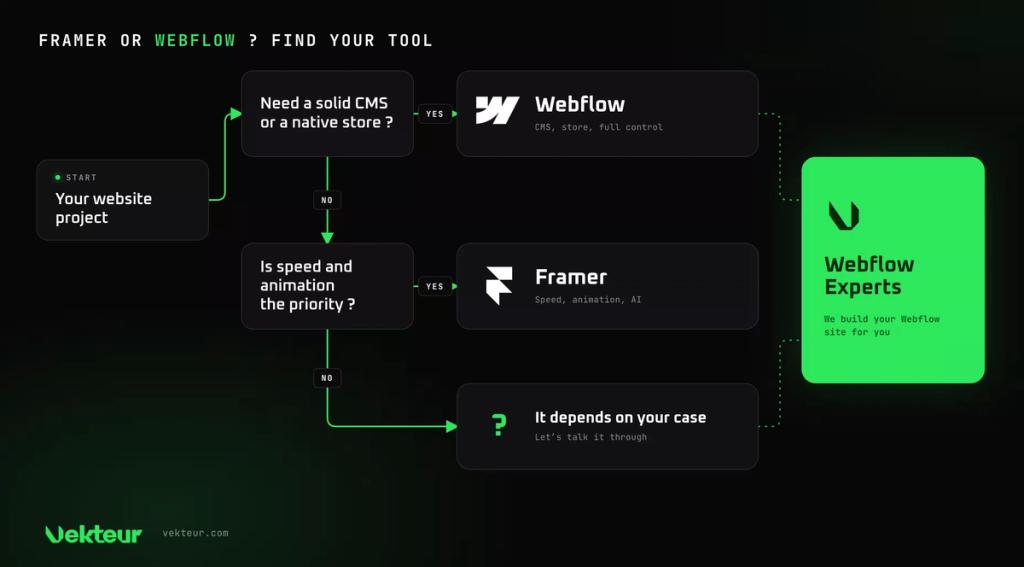
Three questions to choose the right tool for your needs. Follow the branches based on your priorities.
Does your site rely on a lot of content or an online store? If yes, Webflow stands out with its CMS and e-commerce.
If not, are you mainly looking for speed and animation? Framer will get you there faster. And for a turnkey Webflow solution, an agency can handle it.
Our verdict: Framer or Webflow for your project?
Framer is ideal for a fast and animated showcase website, while Webflow is better suited for content-rich sites or online stores designed to last. Your ambition guides the choice.
Choose Framer if…
If you want a quick launch, Framer is the ideal builder to rapidly launch an animated showcase with a limited budget. This tool offers simple onboarding and a smooth experience, accessible to everyone, even without technical skills.
Choose Webflow if…
Webflow is better suited when your site relies on content, an online store, a resource center, or significant growth ahead. You want precise control, a mature ecosystem, and the ability to establish a cohesive design system capable of scaling with your business. It's also the mainreasonto recommend Webflow for this type of project.
| Your profile | Our recommendation |
|---|---|
| Short-term, fast project | Framer |
| Long-term growth project | Webflow |
| Landing page, fundraising | Framer |
| Animated portfolio, tight budget | Framer |
| Blog or resource center | Webflow |
| Online store | Webflow |
| Scalable business website | Webflow |
| What you need to know |
|---|
| Framer: speed, animation and AI, ideal for a showcase and rapid launch. Webflow: CMS, online store and control, ideal for content and growth. Framer costs less; Webflow does more. |
Webflow, yes — but built well
Choosing Webflow is a good start. But you need to make the most of it: clean structure, thoughtful CMS, controlled animations.
That's where a specialized partner makes all the difference. You get the power of Webflow without the learning curve, and a site ready to grow.
Frequently asked questions about Framer and Webflow
Is Framer easier than Webflow?
Yes, especially at first. Its Figma-like approach makes design fast and intuitive. Webflow requires greater learning effort, but allows you to create a website designed for long-term growth.
Framer or Webflow for an online store?
Webflow. Its store is native and complete. Framer has no built-in commerce and relies on external tools.
Which one is cheaper?
Framer, at every tier. It starts around $10 USD per month (on annual subscription), compared to $15 USD for Webflow. But most importantly, compare what each one allows you to do.
Can you switch from Framer to Webflow later?
Yes, but only the content transfers while the design needs to be redone. It's better to choose based on the site's real ambition from the start, or to get professional support.