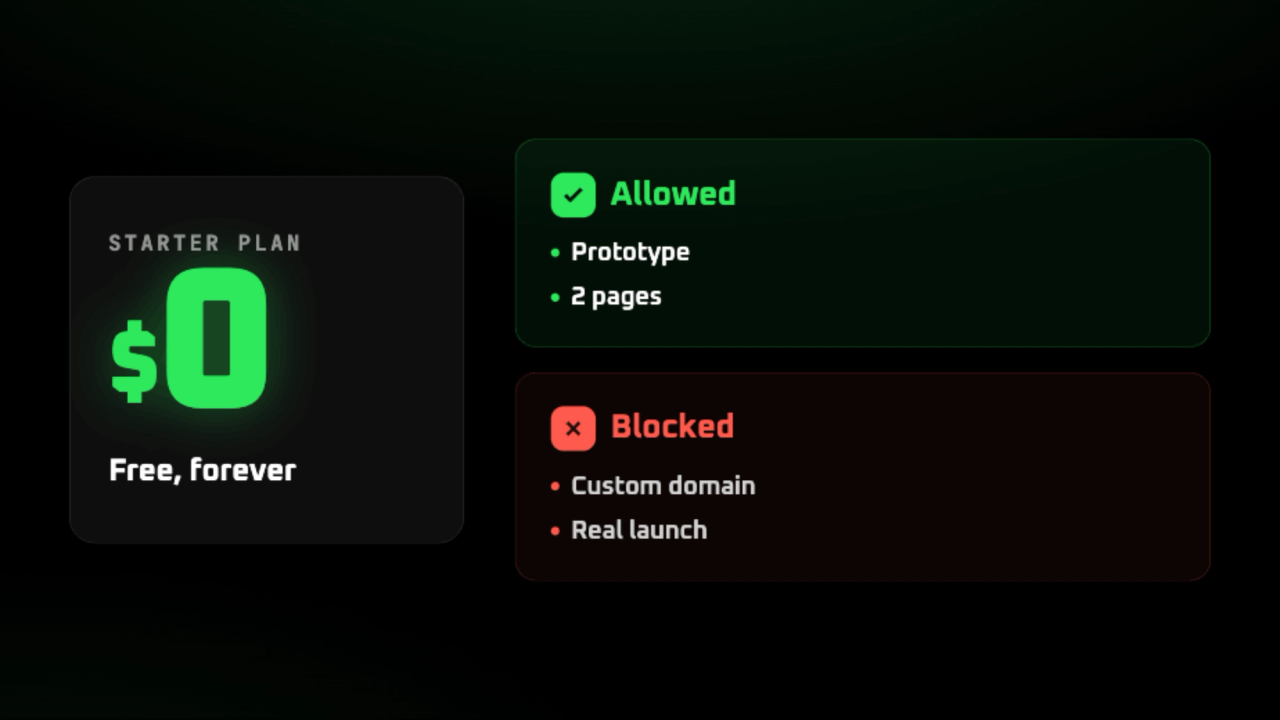
Yes, Webflow offers a free plan. The Starter plan publishes your site at no cost, $0 USD. The most visible limitation: it puts you on a subdomain (an address like mysite.webflow.io), without a custom domain (your own site name, like mycompany.ca).
For a small business, this free plan mainly serves to design and test. You build the site, you show it, you learn the tool. But a webflow.io address inspires little confidence with your clients. A real public site requires upgrading to a paid plan.
| The essentials about free Webflow |
|---|
| Free to design, learn, and test your site without paying. You publish on a webflow.io subdomain, not your own domain. Key limits: 2 pages, no custom domain, no code export (download HTML/CSS to host elsewhere). SSL (the https lock) included, even on the free plan. For a real public site, you need to upgrade to the Basic plan, at $15 USD/month annually. |
Is Webflow really free?
The Starter plan is genuinely free, and not just for a trial period. You design and publish a real site without spending anything.
There's one detail that changes everything. The Starter plan remains free forever, with no end date or credit card required. You keep your site online as long as you want.
Watch out for the main catch. Your site lives on a subdomain, and no custom domain name can be attached to it.
This webflow.io address shows your site to the world. But it sends a clear signal to visitors: this site doesn't yet have its own identity.
So the free plan serves specific uses. It's perfect for designing, learning the tool, or testing an idea before you commit. You explore without financial risk.
On the other hand, free isn't suitable for a public business site Public. An SMB that wants to appear credible needs its own domain, not a webflow.io address.
Don't confuse two concepts that are often mixed up. A trial is limited in time and then closes. The Starter, on the other hand, is a true free plan that lasts.
| Subdomain, what is it? |
|---|
| A subdomain is an address hosted under the platform's name, like mysite.webflow.io. Your site is online and visible, but the address belongs to Webflow, not to you. To get your own name (mycompany.ca), you need to upgrade to a paid plan that unlocks a custom domain. |
| Criteria | Starter Plan (free) | Limited trial |
|---|---|---|
| Duration | Unlimited, forever | A few days then closes |
| Credit card | None required | Often required |
| Site address | Webflow.io subdomain | Variable |
| Custom domain | No | No |
| Good for | Design, learn, test | Evaluate a paid offer |
What you can do with the free plan
Free doesn't mean a limited demo. You get access to the entire Designer, the visual workshop where you build the site. You design a complete site, including structure and layout. Nothing limits your creativity as long as you stay in design mode.
You also start with solid foundations to learn. Webflow gives you access to hundreds of templates ready to customize. Webflow University, their free training center, covers every feature in video. That's enough to skill up on your own.
On the publishing side, you can put online up to 2 pages on the subdomain. SSL is included by default. Your prototype is visible and secure, with no technical setup required on your end.
Your forms work too. The plan accepts up to 50 form submissions total. Enough to test a contact email or validate interest in an offer before moving forward.
It's a genuine testing ground, not a toy. Free serves to learn Webflow, build a prototype to show, or validate an idea before investing. You only pay when the project is ready to become a live site.
| Perfect for validating an idea at zero cost |
|---|
| Learn Webflow thoroughly, including Designer and University. Build an interactive prototype to present to a client or partner. Test a form and a page before paying for a plan. |
| Capacity | Details |
|---|---|
| Complete Designer | The complete visual editor to design your entire site. |
| Templates | Hundreds of ready-to-customize templates. |
| Webflow University | Free video training on every feature. |
| Published pages | Up to 2 pages live on the webflow.io subdomain. |
| Form submissions | Up to 50 submissions total. |
| SSL included | The https padlock activated by default, no setup required. |
What the free plan doesn't allow
The free plan refuses custom domains. Your site stays published on a subdomain. You can't connect your own domain name, like yourcompany.ca. This is the most limiting restriction for a real business.
The free plan also caps your content. You get 2 static pages only (pages with fixed content that doesn't change automatically), which excludes a complete portfolio site. The CMS (the tool to manage content without coding) is limited to about 50 items. An active blog quickly exceeds this threshold.
Bandwidth, or the volume of data sent to your visitors, is capped at 1 GB per month. Forms are limited to 50 submissions. For a site receiving real traffic, you'll hit these caps within a few weeks.
Code export, on the other hand, is not accessible. You remain dependent on Webflow hosting. This restriction mainly affects teams who might want to migrate their site to another server later.
One last point often disappoints. A site published on the free plan displays a "Made in Webflow" badge, removed only when you upgrade to a paid plan. Webflow doesn't insert advertising banners, but this badge signals that the site runs on the free tier.
For a SMB, the conclusion is clear. With these limits, the free plan cannot serve as an official public website. It works for learning, testing, or building a prototype. To put your business online seriously, a paid plan becomes necessary.
Lifting these limits requires a paid plan. Basic unlocks the custom domain, Premium adds the CMS and blog. The tier-by-tier details can be found in our dedicated article on Webflow pricing.
| ⚠️ The subdomain sends the wrong signal |
|---|
| Publishing your site at an address like yourcompany.webflow.io damages your credibility with customers. This address signals an amateur or temporary site, not an established business. A custom domain builds trust and remains essential for a professional presence. |
| Limitation | Free plan | What it takes to lift the limit |
|---|---|---|
| Custom domain | None, webflow.io subdomain required | Basic plan ($15 USD/month annually) |
| Static pages | 2 maximum | Basic Plan |
| CMS and blog | Approximately 50 items, without a dedicated blog | Premium Plan ($25 USD/month annually) |
| Bandwidth | 1 GB per month | Paid plan |
| Form submissions | 50 total | Paid plan |
| Code export | Blocked | Higher paid plan |
Free Workspace or free site plan?
Webflow offers two distinct free options, and the confusion comes from there. The first is a workspace. The second is a site plan. Both cost $0 USD, but they don't serve the same purpose.
The Starter Workspace serves to design and manage your team. It includes 1 full seat and 2 staging projects (a site in progress, unpublished). This is where you work before publishing anything online.
The Starter site plan, on the other hand, is used to publish. It puts your site online at a webflow.io address. This free plan is what makes your work visible to real visitors, without a custom domain.
A beginner has no choice to make between the two. You use both free plans together: the workspace to build, the site plan to publish for testing. They work together, not against each other.
The distinction matters most as you grow. Adding a teammate affects the workspace. Connecting a real domain affects the site plan. Knowing which one blocks you from paying for the wrong plan.
| Two free plans, two roles |
|---|
| The workspace manages design and team (who works on the project). The site plan manages publishing (what visitors see). A beginner activates both at the same time, at no cost. |
| Workspace Starter | Site plan Starter |
|---|---|
| Used to design and manage the team | Used to publish the site online |
| 1 full seat included | Publishing at a webflow.io address |
| 2 staging projects (work-in-progress sites, unpublished) | No custom domain |
| $0 USD | $0 USD |
Who is the free plan enough for?
The free plan is suitable for those whodesign, learn or test, not for those who want a public website.
It provides real value to multiple profiles. You want tolearn Webflow and explorethe Designer without paying. You're a designer building a mockup to validate. You're a student. In all these cases, the free plan does the job perfectly.
It also helpsvalidate an idea before investing. You build a prototype, show it to a partner, measure interest. As long as no one outside judges the site, the subdomain is more than enough.
Free is no longer enough whenclients come into play. A small business that wants a credible website needs a custom domain, so the Basic plan at $15 USD per month annually.
Two other needsalso require paid plans. A site with a blog requires the CMS, so the Premium plan at $25 USD per month annually. An e-commerce store also falls outside the free tier.
Starting with free remains a great approach. You design, you validate,then you migrate to a paid plan when the project goes public. Nothing is lost in this transition.
| The simple test to decide |
|---|
| If clients need to visit your site, free won't cut it. Ask yourself this before choosing: who will see this address? As long as the answer is just you, your team, or a partner, free works fine. The moment prospects or clients are involved, you need your own domain, which means a paid plan. |
| Your situation | Is free enough? | Plan required |
|---|---|---|
| Learning and training with Webflow | Yes | Free |
| Designer testing a mockup | Yes | Free |
| Student or school project | Yes | Free |
| Validating a prototype idea | Yes | Free |
| SMB with credible public site | No | Basic $15 USD/month annually |
| Site with blog | No | Premium $25 USD/month annually |
| Online store | No | Dedicated ecommerce plan |
Moving from free to paid: how much and when
Two concrete needs justify paying. The first: display your site on mycompany.com instead of a webflow.io address. The second: publish a blog or content that changes frequently.
Wanting your own domain remains the number one trigger. The Basic plan unlocks it for $15 USD per month on annual billing. Your site then leaves the webflow.io subdomain.
The Basic plan does not include the CMS. If you run a blog, you need to upgrade to the next plan. This need for dynamic content (pages that update themselves, like a blog or catalog) is the second trigger.
The Premium plan adds the CMS, so the blog. It costs $25 USD per month on annual billing. It's the tier to aim for as soon as your site needs to publish content regularly.
You keep useful room to maneuver. Design your site for free in the Designer, then pay only when you publish on your domain. Nothing forces you to pay before that moment.
These two plans are only part of the pricing grid. For the complete details of levels and options, see our article on Webflow pricing. You'll find every tier explained there.
| The two triggers for moving to paid |
|---|
| Want your own domain (mycompany.com): Basic plan, $15 USD per month annually. Want a blog or dynamic content: Premium plan, $25 USD per month annually. Tip: design for free, pay only when you publish on your domain. |
Frequently asked questions about free Webflow
Is Webflow free?
Absolutely. The free $0 USD offer unlocks access to the Designer, templates, and Webflow University. You can also publish a site on a subdomain. It's a true free offer, with no credit card required.
Is Webflow completely free?
No, not for a complete professional site. The free version designs and publishes on webflow.io, but blocks custom domains. It also limits pages, CMS, and bandwidth. To remove these limits, upgrading to a paid plan becomes necessary.
Does the Webflow free plan expire?
No, the free plan does not expire. It remains available with no time limit, no hidden billing. You keep access to the Designer and your project as long as you want. It's a permanent offer, not a 14 or 30-day trial period.
Can you use your own domain with the free plan?
No, custom domain is excluded from the free plan. Your site stays published on a webflow.io subdomain (for example mysite.webflow.io). To connect an address like yourcompany.com, you need a paid plan. The first one that unlocks the domain is Basic, at $15 USD per month with annual billing.
How many pages with the free plan?
The free site plan allows 2 static pages. That's enough for a home page and a contact page, but not for a rich site. The CMS is limited to around 50 items. To go further, you need the Basic plan at $15 USD per month.
Can you export code with the free plan?
No, code export is not included in the free plan. This feature requires a dedicated paid plan. The free version lets you design and publish on Webflow, but not retrieve files. If hosting elsewhere matters to you, check this before you start.
Is free Webflow enough for a business?
Rarely, for a professional website. The webflow.io address and 2-page limit harm a SMB's credibility. Free is mainly for testing, learning, and designing before publishing. For a serious site with your own domain, the Basic plan at $15 USD per month is the realistic minimum.
How much does upgrading to paid cost?
The first paid plan is the Basic, at $15 USD per month on annual billing. It unlocks a custom domain, but comes with no CMS. Above that, Premium adds the CMS and therefore a blog. For the detailed breakdown of each tier, check our article on Webflow pricing.
Does the free plan display advertising or a Webflow badge?
Webflow doesn't insert a banner ad on your site. However, a site published on the free plan displays a small "Made in Webflow" badge. This badge disappears as soon as you upgrade to a paid plan. So it's a marker of free status, not actual advertising.
Want a site that goes beyond the free plan?
You've validated your idea on the free plan and want a real public site? A Webflow agency guides you from domain to final site.