Wix gets you online in a few hours, without learning anything. Webflow gives you a professional-grade website, at the price of truly taking control. It all depends on your ambitions.
One democratizes website creation, the other takes it to studio level. Let's see what really sets them apart.
| The essentials |
|---|
| Wix: the simplest way to get online fast, accessible to everyone, no skills required. Webflow: the power and control of a designer tool, for a distinctive and scalable website. Wix wins on immediate accessibility; Webflow wins on polish, performance and room for growth. |
Webflow and Wix: mass market versus pro level
Both hide the code, but don't speak to the same audience. Wix is for everyone. Webflow targets designers and demanding businesses first.
Wix, website creation for everyone
Wix democratized the website. Its block-based editor and guided assistant let anyone publish a presentable site.
Its audience is massive: around 280 million registered users worldwide. It's the tool for your first website, from the busy freelancer to the small business.
This accessibility made it a success: no software, no server, no code. You sign up, choose a template, and publish.
Webflow, the tool for professionals
Webflow is like a design studio in your browser. You control every pixel and interaction, without writing code.
Brands like Dell, Zendesk, and Upwork rely on it. It's the playground for agencies and companies that want to stand out.
This level of polish comes with a trade-off: you need to master the tool. Webflow is for those who want a studio-quality result, not for those who just want to be online. Against another design tool, the comparison Framer vs Webflowis also worth exploring.
| Quick definition |
|---|
| No-code creation covers two worlds. On one side, consumer tools that simplify to the extreme. On the other, pro tools that offer developer-level refinement, without the code. Wix belongs to the first, Webflow to the second. Same initial promise, two different levels of demand. |
Webflow vs Wix: what the comparison shows
The decisive differences, side by side.
| Criteria | Wix | Webflow |
|---|---|---|
| Audience | General public, beginners | Designers, companies |
| Getting started | Immediate | Learning curve |
| Design freedom | Framed | Total, to the pixel |
| CMS | Simple | Powerful, dynamic |
| Performance | Fair | Optimized from the start |
| Shop | Turnkey | Custom-built |
| Starting Price | ~$17/month (+ free) | ~$15/month (+ limited free) |
| Ideal for | Fast, simple site | Distinctive, scalable site |
Ease of use: Wix wins hands down at first
To get started without stress, Wixhas no equal. You drag elements, the assistant suggests a base, and the site moves forward quickly.
Webflow requires you to learn tothink like a designer : meta tags (the code behind the scenes that describes the page to Google), layout, styles. The reward comes after the effort.
It's the classic trade-off. Wix trades a bit of freedom for a lot of simplicity. Webflow does the opposite.
Good news:the barrier is not insurmountable. With a little method, you can master the basics of Webflow in a few days.
| Expert insight |
|---|
| Be honest about the time and desire to learn. Webflow rewards those who invest, and frustrates those who just want a website, fast. Many projects start on Wix and switch to Webflow when ambition grows. |
Design and customization: the Webflow leap
On this front, Webflow changes category. No template constraints: you compose exactly the site you imagined.
Wix remains framed by its templates and its blocks. Very good for a polished look, more limited for a truly unique identity.
Another gap: Wix locks your design from the start. Webflow doesn't know this limit: the design stays malleable at all times.
Concretely, two Wix sites often look alike. Two Webflow sites, rarely: each one is shaped custom-made, without imposed templates.
| For your brand image |
|---|
| A brand that wants to stand out quickly hits Wix's limits. Webflow gives it back the freedom of a signature site. That's why so many design agencies adopted Webflow: it doesn't stifle creativity. |
Performance and SEO: Webflow's technical advantage
When it comes to speed, Webflow gets ahead. Its code is lighter and its hosting (where the site is stored and served online), built for performance.
Wix has improved significantly and positions itself very well today. But on a heavy site, the speed difference eventually shows.
Webflow also opens up the technical side : tags, structure, redirects. A real asset when you're seriously aiming for the top of Google.
On mobile too, the gap is noticeable. Webflow adjusts every screen pixel-perfectly, while Wix stays more standardized.
| Good to know |
|---|
| Wix relies on its App Market to expand features; Webflow, on custom code and integrations. Two ways to go further: a catalog of ready-made apps on one side, almost total freedom on the other. |
Selling online: two approaches to e-commerce
Both can sell, but not the same way. Wix offers a turnkey store, ready in a few hours, designed for small catalogs.
Webflow aims for a custom store, integrated into the site design. More upfront work, but superior results and control.
For a handful of products, Wix does the job perfectly. For a store that needs to reflect a strong brand, Webflow takes the lead.
The difference comes down to the degree of integration. On Wix, the store lives somewhat apart. On Webflow, it fits seamlessly into the site design, without visual breaks.
Pricing: how much does each platform cost?
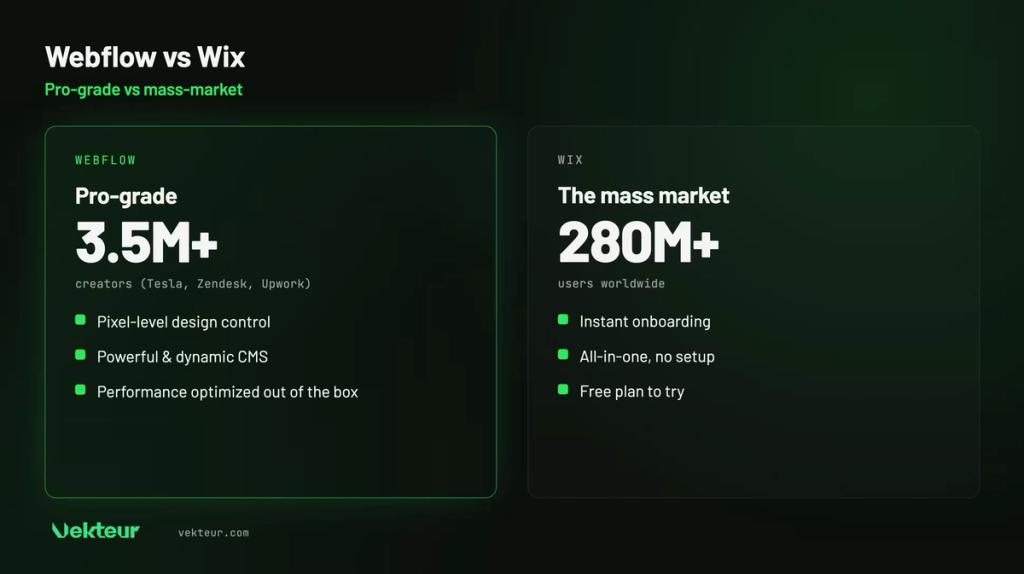
Pricing is close at entry level. Wix starts around $17 per month, Webflow around $15, with different structures.
Wix has one advantage: a free plan to try it out, at the cost of ads and a wixsite.com address. Webflow has one too, but more limited: a webflow.io subdomain. Handy for testing, not for launching a real site.
Webflow's pricing grid is a bit more complex, split between the website and any potential store. But at equal performance, the price gap remains small.
Over time, the right calculation takes usage into account. A small site stays affordable with Wix; an ambitious project quickly justifies Webflow's flexibility.
| Plan | Wix | Webflow |
|---|---|---|
| Free plan | Yes (Wix ads, 500 MB) | Free limited (webflow.io) |
| Paid entry | ~$17/month (Light, 2 GB) | ~$15/month (Basic) |
| Higher plan | ~$29/month (Core, 50 GB) | ~$25/month (Premium, 20,000 CMS elements) |
| Target level | General public | Professional |
| ⚠️ Warning |
|---|
| Don't choose Wix just for simplicity if your project thinks big. Advanced design, high traffic, or complex catalogs quickly hit its limits. Conversely, don't bring out Webflow for a single-page site: that would be overkill for a poster. |
Who chooses what? Three concrete cases
Three typical projects are worth more than a long debate. Each platform has its place.
The consultant who wants a quick website
A consultant wants a simple website built over the weekend, without training. Wix answers exactly that need.
The brand that wants to stand out
A company wants a unique website, true to its image, that inspires confidence. Webflow gives it that studio-quality finish.
The website that needs to grow
A project has a rich blog planned, integrations (connections to other tools, like a payment service) and strong growth ahead. Webflow and its CMS (the tool to manage website content without coding) keep up with the pace.
Webflow or Wix: the decision tree
A few questions, and the answer becomes clear. Let your project decide.
Are you looking above all for simplicity and speed, without having to learn anything? If so, Wix is for you.
Otherwise, are you aiming for a distinctive, high-performing and scalable website ? Webflow crosses that threshold. And to get it without the learning curve, an agency handles it.
Our verdict: Webflow or Wix for your project?
Wix to launch quickly and simply, Webflow to aim high and build for the long term. It's up to you to define your ambition.
Wix is enough if…
You're looking for a website online quickly, with no learning curve, for a tight budget. A simple site (brochure, portfolio, small shop) meets the expectation.
Switch to Webflow if…
Your site needs to be distinctive, fast and built to grow. Design, performance and SEO (your visibility in Google results) truly matter to you.
| Your profile | Our recommendation |
|---|---|
| First site, zero technical knowledge | Wix |
| Simple brochure site, tight budget | Wix |
| Brand that wants to stand out | Webflow |
| Content site, strong growth | Webflow |
| Performance and SEO are priorities | Webflow |
| You want to delegate | Webflow agency |
| What you need to know |
|---|
| Wix: accessible, fast, ideal for first site and small budget. Webflow: professional design, performance and scalability, ideal for brands and growth. With Wix, you publish early. With Webflow, you go higher, once you master the tool. Two questions remain: how far should the site go, and how much time can you dedicate to it? |
Webflow without the learning curve
The power of Webflow comes at a price: time to master it. Many businesseswant the result, not the training.
That's the role ofa specialized agency. You geta polished Webflow siteand high-performing, ready to evolve, without touching the tool.
Frequently asked questions about Webflow and Wix
Is Webflow harder than Wix?
Yes, at first. Webflow isa designer tool, more demanding to learn. In return, it offers flexibility that Wix doesn't have.
Webflow or Wix for SEO?
Webflow keeps the advantage:lighter code, superior speed and technical control. Wix holds its own, especially for a simple site.
Which one is cheaper?
At entry level, it's tight: Wix from $17, Webflow from $15. Wix also offers a free tier, funded by its advertising. In the end, focus less on pricing than the depth of each tool.
Can you move from Wix to Webflow later?
Technically yes, but Wix and Webflowdon't speak the same language: no button bridges them. In practice, you rebuild the site in Webflow and copy the content over. A full project to plan before committing to Wix.