Webflow is today an increasingly popular modern alternative for businesses looking to simplify the technical management of their online presence. While WordPress remains a reference solution for projects requiring total flexibility or complex architecture, the choice between the two will depend mainly on your internal resources and your long-term objectives.
This guide compares the two options to help you make an informed decision.
| The essentials |
|---|
| Webflow brings together custom design, hosting and security in one place: ideal for an SMB without a technical team. WordPress offers maximum flexibility, but maintenance and security remain your responsibility. For a corporate brochure website managed internally, Webflow is an excellent option for an SMB that values peace of mind. |
Webflow and WordPress: all-in-one or build-it-yourself
Webflow brings together everything under one roof. WordPress, on the other hand, is assembled piece by piece on your own hosting.
Webflow, the all-in-one visual creator
Webflow brings together design, hosting and security in a single hosted platform, and its sites are deployed on Amazon Web Services servers. You design your site visually, without writing a single line of code. Everything works from the start, with no extensions to install, hosting included and no server to configure.
WordPress, the open-source software to assemble
As an open source software, WordPress requires you to handle its installation and maintenance. Its strength comes from its ecosystem: over 59,000 extensions available to customize a website, and it remains the choice of many businesses as it is used by 62% of known websites. This freedom gives you more control over the site, but in return, you must handle installation, maintenance, security and technical configuration.
| Quick definition |
|---|
| A CMS (content management system) is used to create and manage a website without coding each page. WordPress is an open source CMS. Webflow combines a CMS and a visual editor in a hosted platform. |
Webflow vs WordPress: the comparison table
Eight essential criteria to guide your choice.
| Criteria | Webflow | WordPress |
|---|---|---|
| Getting started | Simple, visual | Intermediate to technical |
| Hosting | Included | Your responsibility |
| Maintenance | Automatic | Manual |
| Security | Managed by Webflow | Your responsibility |
| Design | Custom, no-code | Varies depending on the theme |
| Extensions | Around 300 | Over 60,000 |
| SEO | Solid by default | Excellent with extensions |
| Annual cost | Predictable | Variable |
Ease of use for a non-technical team
Once your site is built, Webflow allows a team without developers to maintain control of the site on a daily basis. From then on, your team can modify text and images easily from a visual editor, with no technical knowledge required.
With WordPress, the interface quickly becomes complex for users with themes, extensions and updates. A wrong move or an incompatible extension can crash your site. This is why WordPress requires more technical vigilance to avoid downtime and security breaches.
The good news with Webflow: there is a content editor mode reserved for editors. Your writers can collaborate with the rest of the team on content without ever touching the design. The layout remains locked, safe from user errors.
| Expert insight |
|---|
| List the people who will manage the site on a daily basis. If none of them have a technical background, choose a platform that forgives mistakes. A site that's easy to update stays up to date. A complicated site ends up being abandoned. |
Freedom of creation, design and web development
While WordPress has modernized with native Full Site Editing (FSE) and visual builders like Elementor or Bricks, which offer more freedom through design tools to create custom solutions without code, it remains a software "overlay" to manage. Webflow has a clear advantage: its design tool is natively integrated into the platform, like a creation canvas. You can also create complex animations without JavaScript. Ultimately, the experience is much simpler and more stable on Webflow, because you don't have to juggle third-party design extensions that risk slowing down the site or "breaking" your layout during an update.
Design doesn't stop at the desktop. Webflow lets you create layouts that automatically adapt to all screen sizes, then adjust the displayon mobile and tabletas needed. Your visitors enjoy a polished experience, regardless of their device.
| For your brand image |
|---|
| A site that looks like every other one goes unnoticed. A distinctive design reinforces your credibility from the first second. Webflow offers this freedom without technical compromise, which explains its adoption by design studios. |
Why companies are leaving WordPress
Most leave toescape three things: maintenance, security vulnerabilities and accumulated slowness, and some companies also leave WordPress due to lack ofinternal resourcesto maintain the technical structure.
A WordPress site accumulates extensions over time. Each oneneeds to be updated, or else you risk a vulnerability or bug. One oversight, and your site slows down or becomes vulnerable to hackers.
Many companies find theypay a technician every monthformaintenance and security servicesthat end up costing a lot just to keep the site functional. Webflow eliminates this constraint: updates and security are managed by the platform.
The breakthrough often comesafter a concrete incident. A site goes down just before a launch, or an unexpected repair bill arrives. The company then looks for a more stable, more predictable solution that helps reduce technical burden.
| Good to know |
|---|
| Webflow is not a beginner's tool. Over 300,000 brands use it for their sites, including agencies, funded startups, and major brands like Anthropic, Slack, and Dropbox. Choosing Webflow means joining organizations that want a professional site without technical overhead. |
Real costs: how much will you pay?
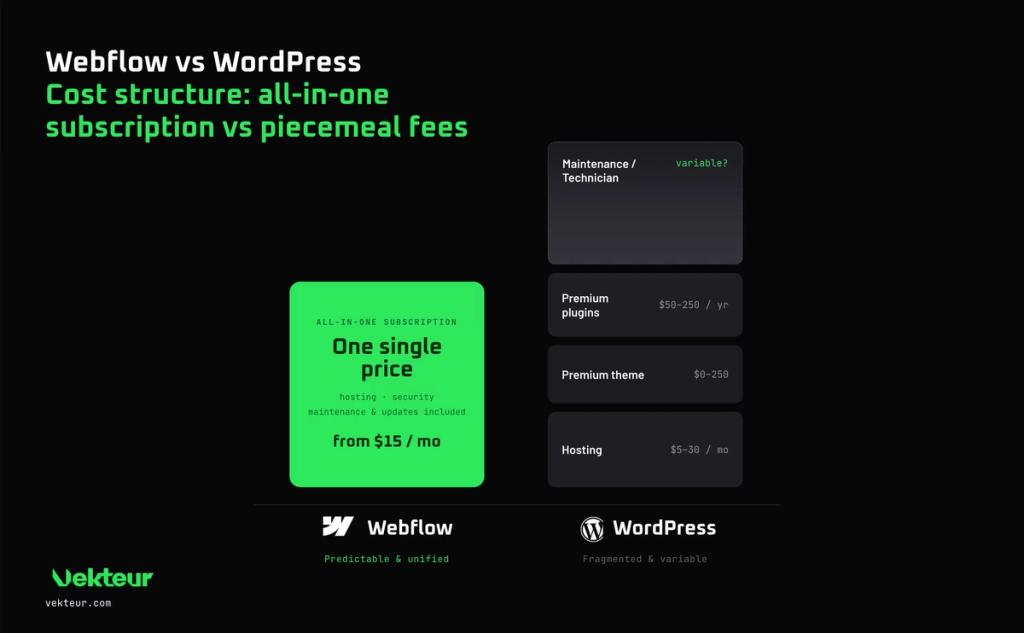
Webflow offers predictable pricing, while WordPress hides variable fees that add up.
Webflow's pricing
Webflow operates on a clear subscription, starting at $15 USD per month on annual billing for the basic plan, and works as a modern website builder with useful features AI based on your needs. Generally, you need to upgrade to the $25 USD per month plan (paid annually) to organize and publish content independently (like a catalog or blog). This price includes hosting, security, and updates. The platform also offers native access to advanced tools like Webflow Insights and Optimize, letting you manage your site without multiplying third-party tools. You pay one amount and know what to expect.
WordPress pricing and hidden costs
WordPress is free, but the software alone isn't enough: you need hosting and a domain name before you can even publish, and you also need to distinguish between the CMS and the hosted service wordpress.com. You have to pay for hosting, sometimes a theme, premium plugins, and sometimes custom code and often a developer. Historically, WordPress relies on PHP and MySQL, which also explains its dependence on technical infrastructure. These additional costs quickly exceed the cost of Webflow.
| Item | Webflow | WordPress |
|---|---|---|
| Hosting | Starting at $15 / month | $5 to $30 / month |
| Security | Included | Plugin or service |
| Theme or design | $0 to $149 | $0 to $250 |
| Extensions | Rarely necessary | $50 to $250 / year |
| Maintenance | Included | Your time or a technician |
| Real-world example |
|---|
| A small business often pays $20 per month for hosting. Add $150 per year for themes and extensions, plus a few hours of technician work. WordPress's "free" option ends up costing more than an all-inclusive Webflow subscription. |
SEO and performance
Both platforms rank well, but Webflow has a head start on speed. Loading speed is important in Google rankings.
Webflow generates clean code and hosts your site on a fast network. Its platform focuses on the power of native optimization, with built-in tools SEO to create and launch pages quickly while improving visibility in search engines, with no effort on your part. WordPress achieves excellent results, but only with good hosting and regular maintenance.
Webflow also takes care of the technical foundations : structured tags, mobile speed and lightweight code. These clean foundations help Google explore your site. These tools also serve to optimize traffic, conversions and their impact on revenue. You're starting on solid ground, and you can also add your analytics tools without relying on a stack of extensions.
Security and maintenance: the hidden cost of WordPress
Webflow secures your site automatically, while WordPress leaves this responsibility to you. The difference weighs heavily for an already busy team, and therefore on internal resources.
WordPress is an ecosystem particularly targeted by hackers. Its operational security relies on proactive management of site and extension updates. For a team that doesn't want to allocate time to this technical maintenance that brings no growth to the company, Webflow's automated management offers a simpler alternative.
| ⚠️ Warning |
|---|
| Maintenance on WordPress should not be neglected. If you don't use a quality hosting provider that automates backups and security, you expose yourself to long-term technical risks like hacking or downtime. Maintenance is not optional: it's a recurring expense to budget for from the start. |
What if your site's needs evolve over time?
A good platform must scale with your growth. Webflow effortlessly handles the addition of pages, sections, or an online store without significantly complicating the structure, and also allows you to create dynamic content without setting up a database. You can add a newsletter and your content without complicating the site structure. The structure remains clean, even after dozens of changes.
WordPress also evolves, but often at the cost of new extensions. Each addition slows down the site and multiplies the risk of conflicts. In the long run, Webflow's simplicity remains the best way to protect your investment.
So, Webflow or WordPress for your business?
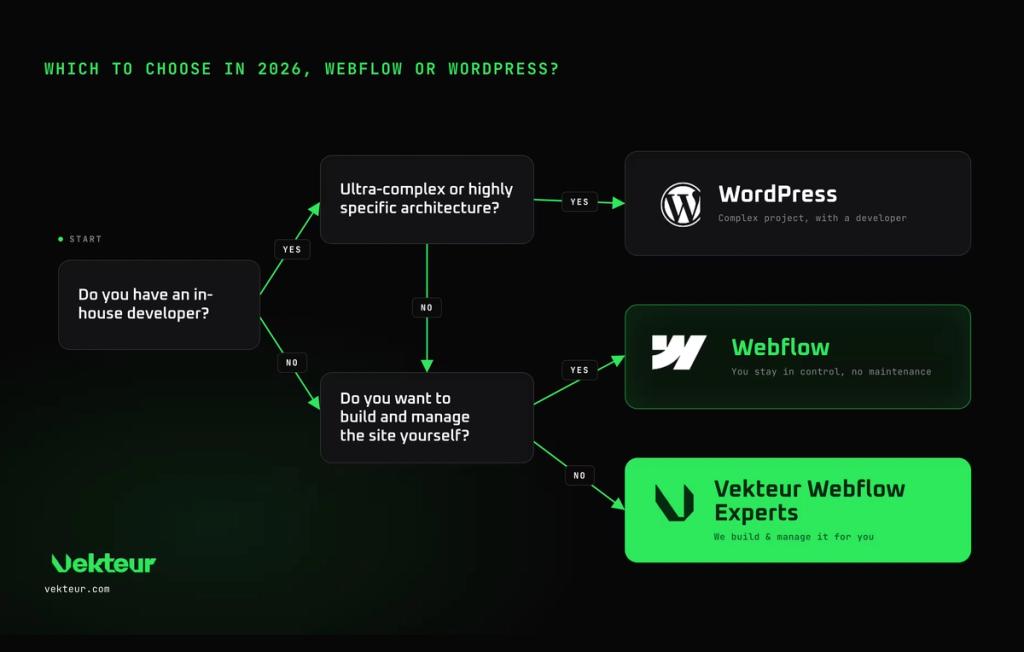
Webflow suits a business site managed in-house, WordPress to a complex project with technical resources. Ultimately, the choice comes down to your priorities: are you looking for the simplicity of a turnkey site or the total freedom of a system to build?
Webflow is right for you if…
You want a professional showcase or transactional website that your team can build and evolve without relying on a developer, and if you need to launch quickly with simple requirements, Webflow is a great fit, especially since native tools within Webflow help personalize the experience for your audience. You prefer predictable costs, zero maintenance, and a website that's truly yours, without sacrificing already integrated features.
WordPress is right for you if…
You're managing a very specific project with thousands of pages or complex features; since version 5.0, WordPress has also introduced the Gutenberg editor, a block editor that enhances user experience and remains particularly strong for managing large volumes of articles. It also allows you to use templates to create more consistent reusable blocks and patterns. You have an in-house developer and you're comfortable taking on site maintenance while benefiting from WordPress's flexibility for more complex needs.
The third option: entrust your project to professionals
Many companies don't want to learn a tool or manage the technical side. Putting your project in the hands of Webflow experts helps you secure your entire web project and gives you a custom-built website, without the technical burden. Dedicate your energy to growing your business rather than tying up your team on technical tasks that aren't your core focus.
A team of experts will also support you after launch: adjustments, new pages, day-to-day management, and guidance. You gain a partner, not just a website. You delegate the technical management so you can focus fully on your business priorities.
| Your profile | Our recommendation |
|---|---|
| SME without technical team | Webflow |
| Showcase site or transactional site | Webflow |
| High-Volume Blog | Webflow or WordPress |
| Custom highly complex project | WordPress with Developer |
| You want to delegate | Webflow Specialized Agency |
| What you need to know |
|---|
| Webflow: custom design, hosting and security included, ideal without a technical team. WordPress: maximum flexibility and "free" software, but with variable and hidden costs (hosting, plugins, maintenance). For a business website, Webflow offers the best simplicity-to-results ratio. |
Frequently Asked Questions About Webflow vs WordPress
Is Webflow really better than WordPress?
For a company website managed without a technicianYes. Webflow is a better-suited platform for a business without technical resources, offering custom design without the maintenance burden of WordPress. For a very complex project with a developer, WordPress still has the advantage, but you need to accept more maintenance and technical management.
Can you migrate from WordPress to Webflow?
Yes. Your content,your pages and your referencing are transferredto Webflow, but a migration is not just about downloading content: you also need to properly restructure the site. A well-executed migration preserves your positions on Google. A professional manages redirects to prevent any loss of traffic, even if you previously relied on WordPress's support ecosystem and resources.
Does Webflow cost more than WordPress?
At first glance yes, because WordPress is free. But you need to consider all the necessary expenses to run WordPress, such as hosting, extensions and maintenance, and Webflow often ends up being cheaper. Its total cost is moreover often better understood when you look at the history of WordPress maintenance expenses over time.
Which one is better for SEO?
Both rank very well. Webflow starts with an inherent speed advantage, with more consistent performance and rendering across browsers. WordPress can match or surpass it, but only with proper maintenance, while benefiting from a vast community to evolve its SEO extensions and best practices.