Webflow deserves 4.2 out of 5 in our view: an exceptional design tool, but with real limitations. It shines for a polished and fast showcase website. It disappoints on large e-commerce, French support and its learning curve.
This is not just another review. At Vekteur, we build Webflow sites every week for our clients. Here are the strengths, limitations and real budget, without compromise.
| Our verdict at a glance |
|---|
| Rating: 4.2/5. Design and performance at the top, steep learning curve. Ideal for: a polished showcase site, a brand that wants to stand out, self-managed content. Avoid if: large online catalog, tight budget, need for French support. Real cost: more than the subscription alone (paid options + design). Our bias, acknowledged: we use it and appreciate it, but we tell you its flaws. |
Our take on Webflow, in brief: 4.2/5
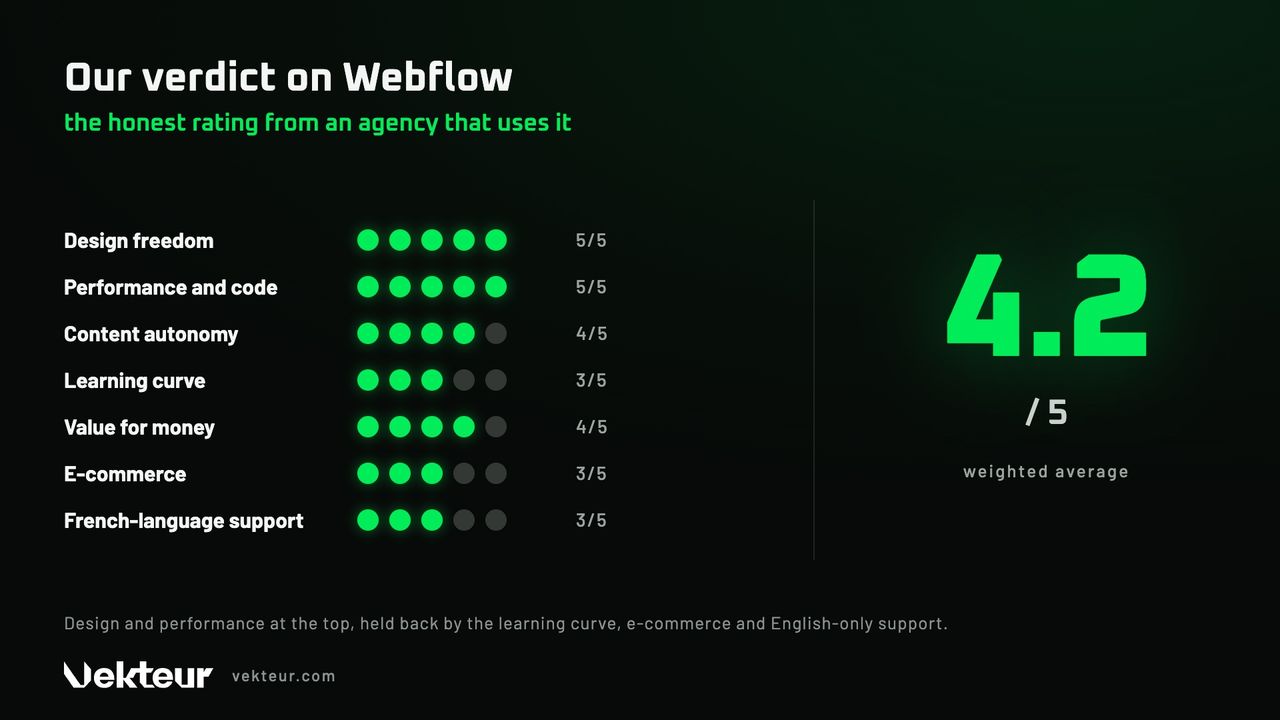
Our overall rating is 4.2 out of 5, a weighted average. It rewards above all a free design and solid performance. It penalizes a demanding learning curve and support only in English.
| Criteria | Note |
|---|---|
| Design freedom | 5/5 |
| Performance and code | 5/5 |
| Autonomy (content management) | 4/5 |
| Getting started | 3/5 |
| Quality-to-price ratio | 4/5 |
| E-commerce | 3/5 |
| French support | 3/5 |
| Overall rating | 4.2/5 |
Unlike many reviews, this rating is based on displayed criteria. You see the strengths and weaknesses, criterion by criterion. Details for each criterion follow immediately after.
| Our bias, in full transparency |
|---|
| We are a Webflow agency: yes, we have a bias toward the tool. That's precisely why we emphasize the limitations, not just the strengths. |
What is Webflow exactly?
Webflow is a visual site creation tool, no-code (you design on screen, the tool generates the code). It targets professional sites with careful design. It combines design, CMS (the tool to manage content without coding) and hosting.
We place it between public builders and custom development. More powerful than Wix, more accessible than coding by hand. For the full mechanism, see how Webflow works.
Webflow's strengths (what justifies its reputation)
Three strengths come up in every review, and we confirm them in the field. Design freedom, performance and autonomy. Here's what they're actually worth.
Design freedom is total. You place each element where you want it, without an imposed grid. The result carries your identity, far from generic templates.
The code produced remains clean and fast. Pages load quickly, which helps with SEO. The hosting (the online space where the site is stored) is included, on a global network.
Your team's autonomy is real. Your colleagues update texts and articles without a developer. The CMS and animations are added without writing code.
These strengths are what give the tool its reputation. We detail them, with figures to back it up, in our article on why choose Webflow. The essence comes down to one idea: power, without heavy technical requirements.
| SEO with Webflow, no corporate speak |
|---|
| Webflow sets solid technical foundations: clean code, speed, accessible tags. But no platform ranks on its own: content and strategy do the rest. "Native SEO" doesn't mean "guaranteed SEO success". |
Webflow's limitations (what they don't tell you enough)
No solution checks every box. Four limitations come up regularly, and we're honest about them. Better to know them before you commit.
Getting up to speed requires real effort. Plan a few days to a few weeks to feel comfortable. It's more demanding than Wix, and it discourages those in a hurry.
Collaborating with multiple people is limited. Only one person can edit the design at a time, and the last save overwrites others. For a large team, that's a real bottleneck.
Online selling works for a small to medium-sized shop. Beyond a large catalog or advanced logistics, Shopify is more complete. Webflow is primarily built for showcasing.
Last point, critical in Quebec: the interface and support are in English. For a French-speaking SMB used to service in French, that's a significant factor. Help resources are also mostly English-language.
| ⚠️ Things to check before you get started |
|---|
| Have your team test the English interface before signing. Portability: leaving Webflow means exporting the code and rehosting it elsewhere. It's possible, but not without effort. |
How much does Webflow really cost?
The subscription is only part of itvisible. A brochure site or one with a blog runs around $20 to $35 CAD per month. But the real cost adds up other line items, often forgotten.
| Item | Indicative cost ($CAD approx.) |
|---|---|
| Brochure site subscription | ~$21 CAD/month |
| Blog site subscription | ~$35 CAD/month |
| Multilingual module (per language) | ~$13 CAD/month and up |
| Design (DIY → agency) | your hours → a few thousand $ |
Two line items inflatethe bill. Paid options depending on needs, and multilingual charged per language. For a bilingual SMB, the latter really adds up.
Then there's design, the most variable line item. Doing it yourself only costs your time. An agency delivers turnkey, on quote. The details of our packages are in our article onWebflow pricing.
| Good to know |
|---|
| A free plan lets you design and test before paying, on a webflow.io address. Its limitations are detailed in our article on free Webflow. Handy to get a feel for it without pulling out your card. |
When Webflow is the right choice, and when it isn't
Webflow is not for everyone, and that's perfectly fine. It excels for some profiles and disappoints others. Here's how to assess honestly whether it's right for you.
| Webflow is a good choice if… | Look elsewhere if… |
|---|---|
| You want a distinctive showcase website | You're building a large online store |
| Your brand needs to stand out | Your budget is very tight (a Wix will do) |
| You manage your content yourself | You want an application with accounts and dashboards |
| Performance and SEO matter | You require French language support |
For a simpler project or an ambitious store, another solution will work just fine. What matters is matching the tool to your real needs. We compare the options in our article on alternatives to Webflow.
Do you need technical skills? Our field experience
The question comes up all the time: do you need to code? No, not for a standard website. But you do need to understand web logic, which requires some learning.
How long does it take?A few days to a few weeks for the tool. A bit longer to build a real website. We detail these timelines in our articles Do you need to know how to code and how long does it take to create a website.
That's where an agency makes a difference . It already masters the tool and delivers you a finished result, with no learning curve on your end. You then take control of your content.
| Outsource or go solo: our perspective |
|---|
| A website that reflects your image, with a deadline to meet: an agency secures the result. You have time and the curiosity to try: test the free plan and judge for yourself. |
Still unsure about Webflow?
An outside opinion is better than a gamble. Tell us about your project, and we'll tell you frankly whether Webflow is the right tool, or not.
We use it enoughto know its strengths as well as its weaknesses. Might as well have that knowledge before you commit.
Frequently asked questions about Webflow
Is Webflow worth it?
Yes, for a professional showcase website that needs to last and rank well. You're paying for design freedom, performance and autonomy. For a simple need or a large e-commerce store, an alternative will do.
What does a Webflow site cost?
Expect around 20 to 35 CAD per month in subscription for a brochure site or one with a blog. Design is added on top, from your hours to several thousand dollars at an agency.
Is Webflow safe to use?
Yes. Hosting, SSL certificate (the "https" padlock) and backups are managed by Webflow. You don't have any server or security patches to monitor.
Is Webflow free?
A free plan exists to design and test, but on a webflow.io address, without a custom domain. For a real public site, a paid plan is necessary.
Is Webflow good for SEO?
It helps, without working miracles. Clean code, speed and accessible tags lay good foundations. But content and strategy do the rest: "native SEO" is not "SEO won".
Is Webflow suitable for e-commerce?
For a small or medium-sized store, yes. For a large catalog or advanced logistics, Shopify remains more complete. Webflow targets the brochure site first, not large-scale commerce.
Do you need to know how to code to use Webflow?
No, not for a standard site. You design visually and the tool generates the code. Understanding web logic helps, but it's not programming.
Is Webflow suitable for a Quebec SMB?
Yes for image and performance, with a caveat : the interface and support are in English. For French-speaking clients who value service in French, this is a criterion to weigh.