It all comes down to one question:do you want to get technical? Wix handles it for you, without you managing anything. WordPress gives you full control, but only if you're willing to get your hands dirty.
These two platforms target opposite profiles.Your comfort with technologywill do most of the work. We compare, without beating around the bush.
| The essentials |
|---|
| Wix brings hosting, security and visual editor together in one place: a live site in a few hours, with nothing to manage. WordPress relies on control and a massive ecosystem; in return, maintenance and security rest on your shoulders. The right choice mainly depends on your relationship with technology and how much time you want to spend on it. |
WordPress and Wix: power versus simplicity
They're complete opposites.Wix takes you by the hand, WordPress puts the keys in your hands.
Wix, simplicity all in one
Wix brings hosting, security and visual editor all in one place. You create your site by drag and drop, without installing anything. Everything is ready from signup, in just a few clicks.
The platform claims over 280 million users registered users worldwide. This popularity stems from a simple promise: get a website online without any technical skill.
WordPress, freedom for those who know how to use it
WordPress is a open-source software that you deploy on the hosting of your choice. It powers a huge portion of the web, proof of its robustness. In return, you manage everything: settings, extensions and maintenance.
Nearly 43% of all websites run on WordPress, and six CMS-powered sites out of ten. This dominance is built on an ecosystem of over 60,000 extensions (small modules you can add to gain new features), capable of almost anything.
| Quick definition |
|---|
| A CMS, or content management system, saves you from coding each page: everything is controlled from a dashboard. WordPress is this CMS in open-source form, deployed on your own hosting. Wix provides platform and hosting in one package. |
WordPress vs Wix: the differences that matter
What really sets the two platforms apart, summed up line by line.
| Criteria | Wix | WordPress |
|---|---|---|
| Getting started | Very simple, visual | Technical, requires learning |
| Hosting | Included | Your responsibility |
| Maintenance | Automatic | Manual |
| Security | Managed by Wix | Your responsibility |
| Freedom | Defined framework | Nearly unlimited |
| Extensions | Wix Applications | Over 60,000 |
| Shop | Integrated | WooCommerce |
| Monthly cost | Fixed and predictable | Variable |
To get started, which one makes your life easier?
Without hesitation, Wix. You can launch a presentable website in just a few hours, without outside help. The editor guides you, and nothing breaks if you experiment.
WordPress, on the other hand, requires real learning. Choosing hosting, installing a theme, configuring extensions: so many steps that discourage beginners.
This difference matters a lot at the start. With Wix, you see your site take shape in real time. With WordPress, you first have to assemble the pieces before creating even a single page.
Wix also offers an assistant that generates an initial version of your site from a few answers. WordPress doesn't offer anything like that by default: you start from a blank page.
In practice, WordPress requires you to book hosting, connect a domain name (your site's address, like mysite.com) and install the software. These few technical steps often discourage you before even the first page.
| Expert insight |
|---|
| Before choosing, count the hours you can realistically dedicate to your site each month. If the answer is "almost none", favor Wix. A simple site to manage stays up to date; a complicated site ends up abandoned. |
Freedom and control: WordPress's playground
This is where WordPress regains the advantage.Nothing is locked down: you can touch the code, add any function and shape the site exactly as you imagine it.
Wix, in exchange for its simplicity,sets limits. You work within a defined framework, without access to code. For a showcase site, this framework is more than enough.
This freedomcomes at a cost. The more you can do, the more you need to know how to do it. WordPress rewards the curious and frustrates the impatient.
The ecosystem changes everythingover time. Need a booking calendar, a member area, or another language? An extension almost always exists, whereas Wix depends on its app catalog.
A classic pitfall:not confusing WordPress.com and WordPress.org. The first is a hosted and limited version. The second, the free software we're talking about here, offers true freedom.
| Good to know |
|---|
| WordPress's openness is also its strength: no publisher can shut down your site or block a feature. You remain the owner of everything, and you can move your site to another host whenever you want. |
Selling online: how do the two compare?
For online sales, each has its answer. Wix integratesa ready-made store, simple to launch. WordPress relies on WooCommerce, a very powerful free extension, but more demanding to configure.
WooCommerce powers nearly a third of online stores worldwide. This dominance gives access to thousands of modules: payments, shipping, subscriptions, tax calculations.
For a few products, Wix is enough and you launch quickly. For an ambitious catalog with specific rules, WooCommerce offers much more room to maneuver.
Think about the details that matter at checkout: payment methods, shipping costs and taxes. Wix handles them within a guided framework. WooCommerce opens them wide, at the cost of some configuration.
Wix also manages in-person sales, with a terminal to process payments at the counter. Useful if your business thrives both online and in a physical store.
| Real-world example |
|---|
| A dozen products, careful photos and simple payment? The Wix store is online the same day. Hundreds of items, bulk promotions and detailed inventory management? WooCommerce quickly becomes essential. |
How much does each solution cost?
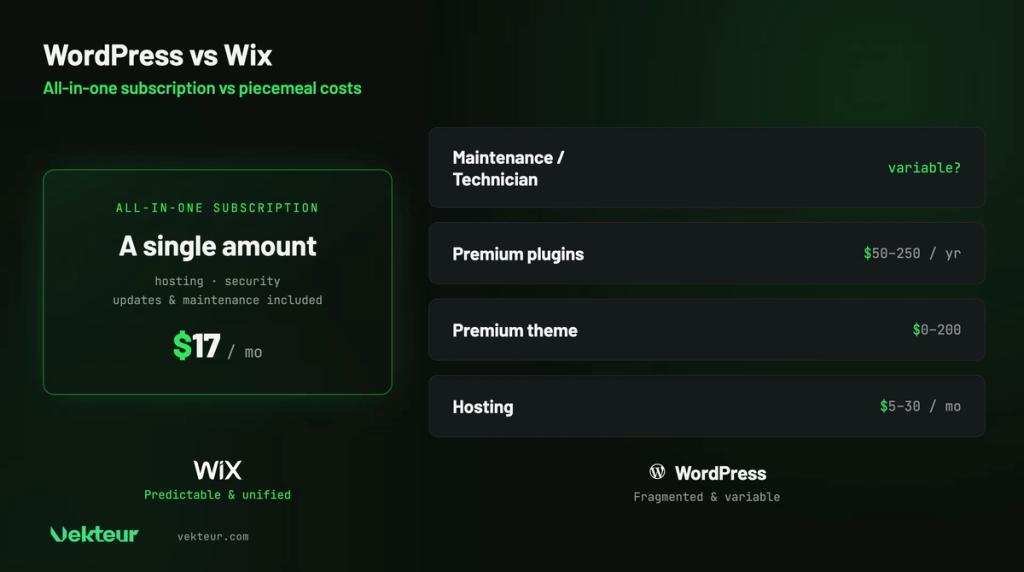
Wix displays a clear price per subscription, starting around $17 USD per month. Downloading WordPress costs nothing, but everything else is paid : hosting, theme, extensions and sometimes a technician.
In the end, Wix proves to be often more predictable. WordPress can cost less, or much more, depending on your needs and independence.
One detail matters over time. With Wix, the price is known in advance, each month. With WordPress, the bill varies depending on extensions and the help you need.
Over three years, the calculation becomes clear. A Wix site runs around $600 all-inclusive. A well-maintained WordPress site ranges from $500 to over $2,000, depending on extensions and support.
| Item | Wix | WordPress |
|---|---|---|
| Software | Included | Free |
| Hosting | Included | $5 to $30 / month |
| Security | Included | Plugin or service |
| Theme or design | Included | 0 to $200 |
| Extensions | Wix Applications | $50 to $250 / year |
| Maintenance | Included | Your time or a technician |
| ⚠️ Warning |
|---|
| WordPress's « free » often misleads beginners. The software costs nothing, but the site itself has a price. Add hosting, premium extensions and maintenance before comparing: it's the only honest calculation. |
SEO: who helps you get found best?
Both can rank very well on Google. Wix has made great progress and offers built-in assistants. WordPress, with dedicated extensions, offers even finer control.
For typical use, Wix is more than enough. For a serious content strategy, WordPress maintains a notable technical advantage.
On the blog side, WordPress starts with solid heritage: it was born as a publishing tool. Categories, tags and author management are more complete. Wix works fine, but is less rich for publishing a lot.
Wix has long lagged a poor reputation for SEO. Those days are gone : the platform now produces clean code and proper meta tags (the behind-the-scenes markers that describe the page to Google). Yesterday's shortcomings shouldn't weigh on your decision anymore.
At the end of the day, your content matters more than the tool. Useful articles and well-chosen keywords make the difference, regardless of the platform.
Maintenance: the effort Wix spares you
With Wix, you have nothing to maintain. Updates, security, and backups run in the background. It's one less burden to worry about.
WordPress requires regular monitoring. Every extension updates, or risk vulnerabilities or crashes. Without maintenance, the site becomes fragile over time.
Many businesses underestimate this work. A site left unmonitored eventually causes problems, often at the worst moment. It's better to plan for maintenance from day one.
A healthy WordPress routine comes down to three steps: backup, update, verify. Plan for one to two hours per month, or use managed hosting that handles it for you.
How far can your site grow?
Your site will evolve with your business. Wix supports reasonable growth : new pages, sections, small shop. Beyond a certain point, you hit its limits.
WordPress, on the other hand, has virtually no ceiling. Complex sites, thousands of pages, rare features: almost anything becomes possible. As long as you have the skills to keep up.
The real risk isn't lacking power, but having too much for your needs. A brochure site on WordPress is sometimes a truck to go get bread.
If you ever exceed Wix's limits, getting out requires effort. Content can be recovered, but the layout needs to be redone. Better to anticipate this milestone from the start.
Who chooses what? Three concrete cases
Profiles often speak louder than criteria. Here are three common situations and the platform that stands out.
The busy freelancer
A photographer wants an online showcase by the end of the weekend, without learning anything. Wix checks all the boxes: a template, their photos, and the site is published.
The shop that wants to grow
A business aims for a large catalog, promotions and detailed inventory management. WordPress and WooCommerce offer the room to maneuver to pursue this ambition.
The organization with changing needs
A nonprofit needs a blog, online donations, and a member space, all scalable. The WordPress ecosystem covers these functions throughout your projects, without changing tools.
WordPress or Wix: the decision tree
To decide in seconds, follow the thread of your answers. Three questions are enough to point to the right platform.
Are you comfortable with technical matters, or do you have a developer on hand? If yes, and the project is complex, WordPress will give you complete flexibility.
Otherwise, do you want to manage the site yourself day-to-day? If yes, Wix makes your life simpler from start to finish. If not, a custom site entrusted to an agency remains the most peaceful path.
Our verdict: WordPress or Wix for your project?
Wix to get started quickly and stay independent, WordPress for total control with technical resources. Your situation settles the question.
Choose Wix if…
You're aiming forthe fastest possible launch without ever touching code. A single subscription and no maintenance give you peace of mind. A website or small store covers your needs.
Choose WordPress if…
Your project has specific requirements andneeds to do everything. You have a developer on hand, or the budget to hire one. Having control over every detail matters to you.
| Your profile | Our recommendation |
|---|---|
| First site, zero technical knowledge | Wix |
| Website or small store | Wix |
| High-volume blog | WordPress |
| Ambitious store, strict rules | WordPress + WooCommerce |
| Complex custom project | WordPress with Developer |
| You want to delegate | Custom website (agency) |
| What you need to know |
|---|
| Wix: simple, all-in-one, predictable, ideal without technical skills. WordPress: nearly unlimited freedom and power, but maintenance on your shoulders. WordPress's "free" cost hides recurring expenses. Your relationship with technology, more than the price, should guide your choice. |
Should you consider a custom site?
Between WordPress's independence and Wix's simplicity, there isa middle ground. It only makes sense if neither of the two truly suits you.
A site built on Webflow, or entrusted to an agency, combines unlimited design freedom with maintenance handled for you. Worth considering if you want a distinctive look without managing the technical side. Without that specific need, Wix or WordPress remain excellent choices. And if Webflow tempts you,compare it to Framer before choosing.
Frequently asked questions about WordPress and Wix
WordPress or Wix, which is easier?
Wix, by far. Its visual editor lets you create a website without any technical skills. WordPress requires a much longer learning curve.
Is Wix cheaper than WordPress?
Often yes, in practice. The software costs nothing, but hosting, extensions and maintenance add up. For a small site, Wix remains more predictable.
WordPress or Wix: which ranks better on Google?
On Google's side, both hold their own. WordPress offers finer control through extensions. Wix works for everyday use, with simpler tools.
Can you switch from Wix to WordPress later?
Yes, but migration takes work: content transfers, layout doesn't. It's better to choose wisely from the start, or have a professional handle it.